
Bot traffic tracking
See when AI assistants, search engines, and model-training crawlers request pages on your website.
Get started
Install the server-side package, add one tracking call in your backend, then deploy. This is separate from the normal DataFast browser tracking script.
1. Install the package
npm install @datafast/ai-crawl
2. Add it to your server proxy
Here is the most common setup for a Next.js app hosted on Vercel (more examples below):
// proxy.ts
import {
  NextResponse,
  type NextFetchEvent,
  type NextRequest,
} from "next/server";
import { trackAICrawlerRequest } from "@datafast/ai-crawl";

export function proxy(request: NextRequest, event: NextFetchEvent) {
  // 👇 DataFast AI crawler tracking starts here 👇
  trackAICrawlerRequest(request, event, {
    websiteId: "dfid_******",
  });
  // 👆 DataFast AI crawler tracking ends here 👆

  return NextResponse.next();
}

export const config = {
  // Optional: avoids running proxy for obvious API/static asset requests.
  // Keep crawler-facing files trackable: robots.txt, llms.txt, and sitemaps.
  matcher: ["/((?!api|_next/static|_next/image|favicon.ico).*)"],
};
proxy.ts (previously called middleware.ts / middleware.js), or use your backend, edge function, or worker. Pass the runtime context, such as event or context, so the package can use waitUntil internally. ❌ Do not await trackAICrawlerRequest; call it, then return your response.3. Deploy and check your dashboard
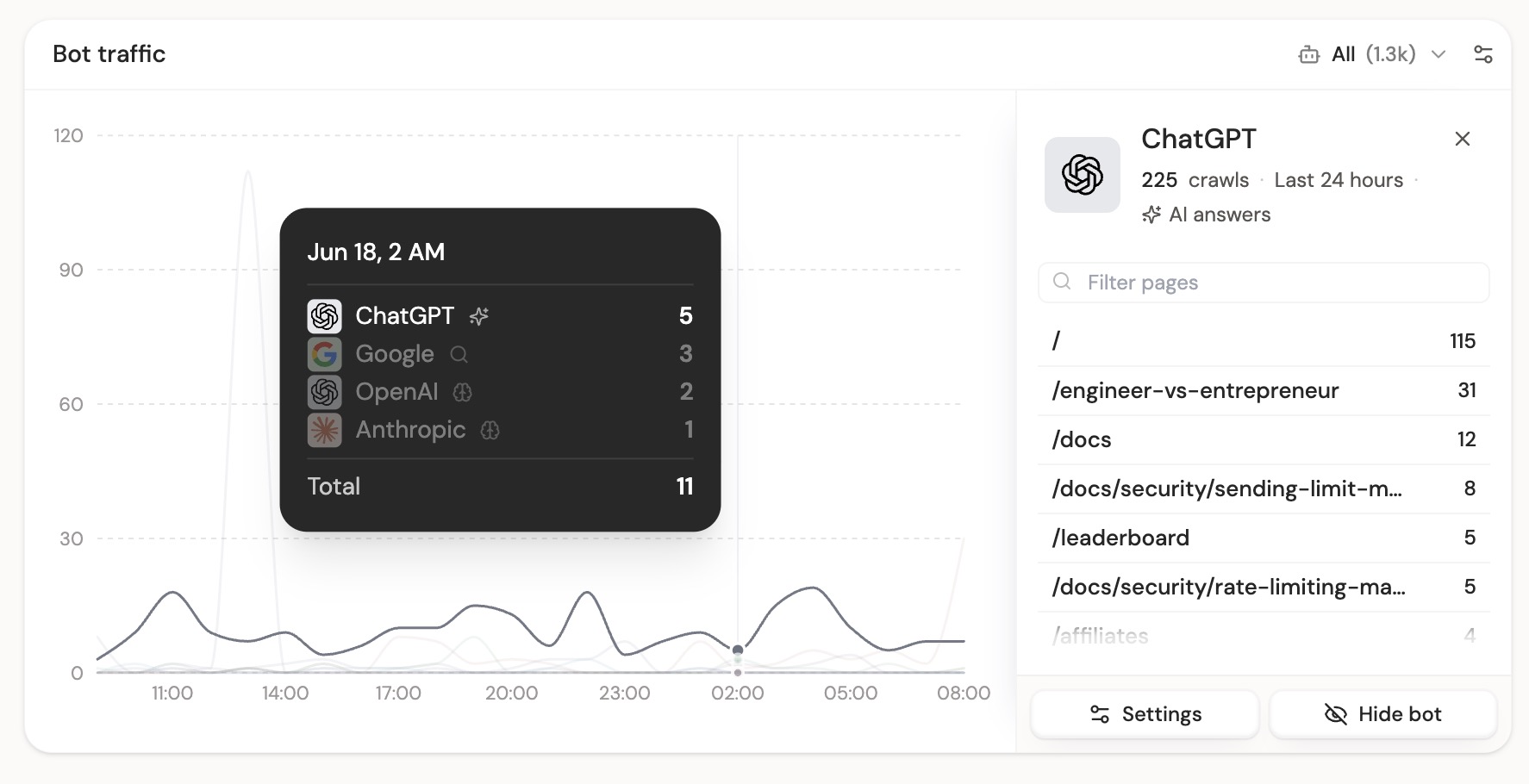
After deployment, open your DataFast dashboard and look for the Bot traffic card. You can filter by AI answers, indexing, training, and IP verification confidence.
Using Cloudflare, Express, Hono, or another backend? Use the platform examples below.
What this tracks
AI tools and search crawlers now read your site before many users do. The pages they request show what they are trying to answer, index, or learn from, including missing URLs they expected to find.
DataFast groups bot traffic into three main categories:
| Category | Practical example | Why it matters |
|---|---|---|
| AI answers | A user asks ChatGPT about your product, and ChatGPT requests your pricing or docs page to answer accurately. | Shows which pages AI assistants fetch when users ask questions. |
| Indexing | Googlebot, Bingbot, or PerplexityBot requests your pages to update search or answer indexes. | Shows which companies are discovering and refreshing your content. |
| Training | Anthropic's ClaudeBot, OpenAI's GPTBot, Applebot, Google Cloud Vertex Bot, Bytespider, or another training crawler requests public content. | Shows which crawlers are collecting public pages that may be used for model training or large-scale datasets. |
 OpenAI
 Anthropic
 Gemini
 Google
 Microsoft
/free-trial, /docs/get-started, or another path that does not exist, that can be a useful content signal. It may mean users, agents, or crawlers expect that page to exist.Crawler-facing files
DataFast also tracks crawler-facing files when known bots request them:
/robots.txt/llms.txt/llms-full.txt/sitemap.xmland sitemap XML files- content files such as
/docs/setup.mdor/startup/example.md
These files matter because AI assistants, search engines, and training crawlers often request them before crawling the rest of your site. Seeing those requests helps you know whether bots are discovering your AI/SEO instructions and structured content.
How the package works
The package runs in your backend, middleware, edge function, or worker. For each request, it quickly ignores obvious static assets, API routes, framework internals, and normal human browser traffic. If the request looks like bot traffic, it sends a small event to DataFast.
robots.txt, llms.txt, llms-full.txt, sitemap XML files, and markdown content can appear in Bot traffic when they come from known crawlers.DataFast then classifies the provider, crawler type, confidence, and IP verification on the server. This keeps crawler lists and IP ranges up to date without asking every customer to upgrade the npm package each time a crawler changes.
waitUntil, the package uses it internally when you pass the runtime context. Call trackAICrawlerRequest, return your response immediately, and DataFast finishes in the background. Do not await it in proxy/middleware.Bot traffic tracking runs server-side because AI crawlers often request raw HTML and skip frontend JavaScript.
Platform examples
Next.js / Vercel Proxy
proxy.ts (previously called middleware.ts / middleware.js):// proxy.ts
import {
NextResponse,
type NextFetchEvent,
type NextRequest,
} from "next/server";
import { trackAICrawlerRequest } from "@datafast/ai-crawl";
export function proxy(request: NextRequest, event: NextFetchEvent) {
trackAICrawlerRequest(request, event, {
websiteId: "dfid_******",
});
return NextResponse.next();
}
export const config = {
// Keep robots.txt, llms.txt, and sitemap files reachable by this proxy.
matcher: ["/((?!api|_next/static|_next/image|favicon.ico).*)"],
};
event.waitUntil, so the DataFast request is scheduled in the background. Middleware runs before the final page response, so status code is usually stored as unknown.Cloudflare Pages
functions/_middleware.ts:import { trackAICrawlerRequest } from "@datafast/ai-crawl";
export async function onRequest(context) {
trackAICrawlerRequest(context.request, context, {
websiteId: "dfid_******",
});
return context.next();
}
context.waitUntil. The package uses it internally, so Cloudflare can continue returning the HTML response while the DataFast request runs in the background._routes.json to your build output:{
"version": 1,
"include": ["/*"],
"exclude": [
"/assets/*",
"/static/*",
"/_next/*",
"/favicon.ico",
"/*.css",
"/*.js",
"/*.png",
"/*.jpg",
"/*.svg",
"/*.ico",
"/*.woff2"
]
}
_routes.json prevents Cloudflare from invoking your Function for obvious asset requests. Do not exclude crawler-facing files such as /robots.txt, /llms.txt, /llms-full.txt, or /sitemap.xml if you want to see crawler activity on those files.Cloudflare Workers
withAICrawlerTracking:import { withAICrawlerTracking } from "@datafast/ai-crawl";
export default {
fetch: withAICrawlerTracking(
async (request: Request, env: Env, ctx: ExecutionContext) => {
return fetch(request);
},
{
websiteId: "dfid_******",
},
),
};
ctx.waitUntil when available, so tracking is best-effort and non-blocking.Custom Docker, Cloud Run, or reverse proxies
localhost or 0.0.0.0, set the public origin explicitly:trackAICrawlerRequest(request, context, {
websiteId: "dfid_******",
publicOrigin: "https://example.com",
});
DataFast preserves the requested path and query string and still validates the resulting hostname against your website configuration.
Express
import express from "express";
import { createExpressAICrawlerMiddleware } from "@datafast/ai-crawl";

const app = express();

app.use(
  createExpressAICrawlerMiddleware({
    websiteId: "dfid_******",
  }),
);
next() immediately. It attaches a finish listener and sends the bot traffic event after the response has already been sent, so your app does not wait for DataFast before continuing.Hono
import { Hono } from "hono";
import { trackAICrawlerResponse } from "@datafast/ai-crawl";

const app = new Hono();

app.use("*", async (c, next) => {
  await next();

  trackAICrawlerResponse(c.req.raw, c.res, c.executionCtx, {
    websiteId: "dfid_******",
  });
});
Use this when your Hono runtime gives you access to both the final response and an execution context.
Generic Request / Response handler
Request and Response, track after your app creates the response:import { trackAICrawlerResponse } from "@datafast/ai-crawl";
export async function handleRequest(request, context) {
const response = await yourAppHandler(request);
trackAICrawlerResponse(request, response, context, {
websiteId: "dfid_******",
});
return response;
}
If your backend only gives you the request before the response exists, use request-only tracking:
import { trackAICrawlerRequest } from "@datafast/ai-crawl";

export function middleware(request, context) {
  trackAICrawlerRequest(request, context, {
    websiteId: "dfid_******",
  });

  return next();
}
Request-only tracking is enough to know which page the bot tried to crawl. Response-aware tracking only adds status code when it is easy to get.
Optional request authentication
You can add a website-specific Bot traffic token without interrupting an existing integration:
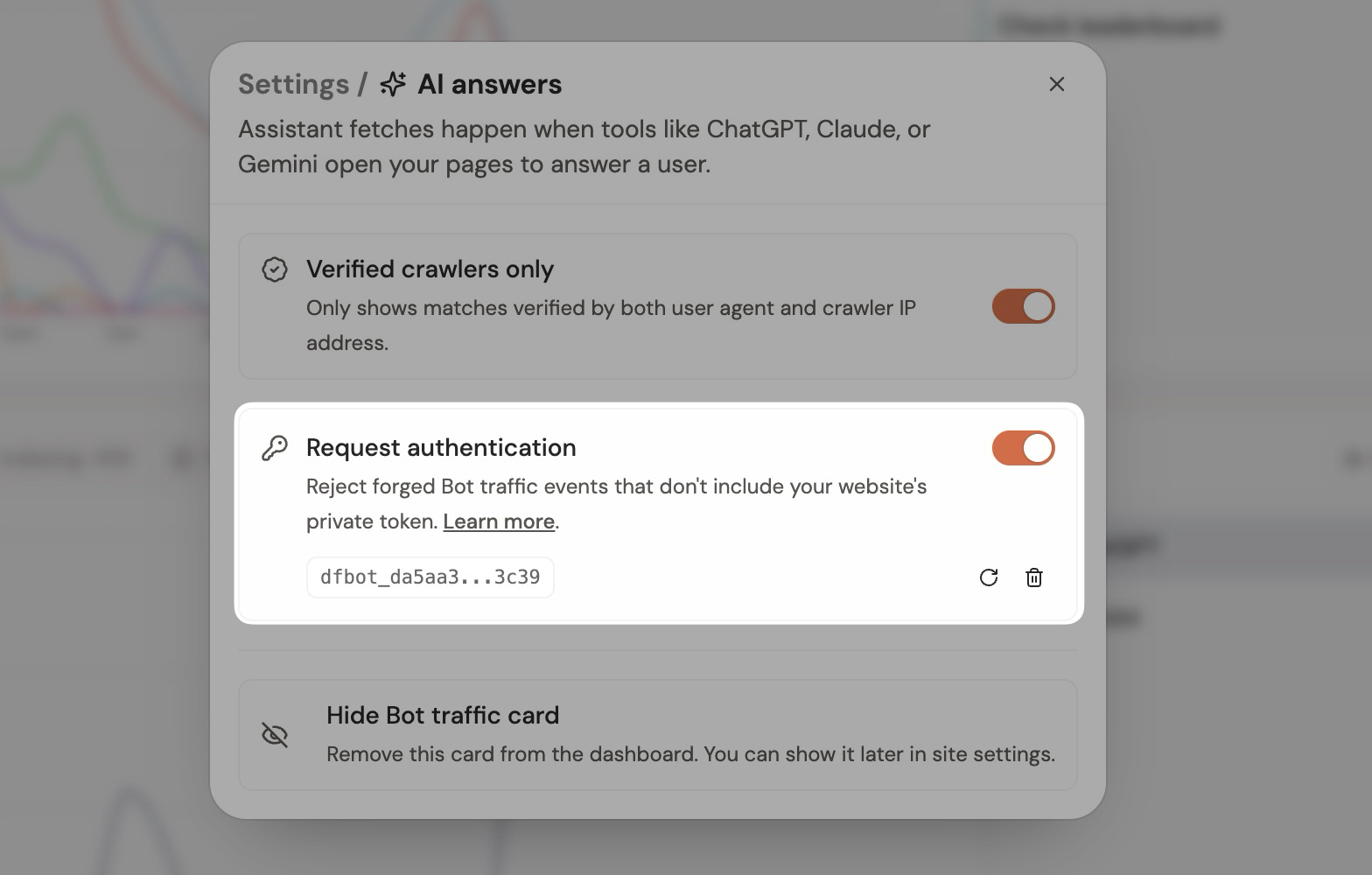
- Open the Bot traffic card settings and create a token.
- Add it to your server-side package configuration.
- After the new configuration is deployed, enable Reject unauthenticated requests.
trackAICrawlerRequest(request, event, {
  websiteId: "dfid_******",
  authToken: process.env.DATAFAST_BOT_TOKEN,
});
dfbot_... token in a server-side environment variable. Never expose it in frontend JavaScript, a public repository, logs, or a URL. Authentication is optional and enforcement is off by default, so token validation does not affect whether requests are accepted until you enable Reject unauthenticated requests. If you rotate the token, the previous token stops working immediately. Deleting the token automatically turns request authentication off.Use without Node.js (PHP or any backend)
You do not need Node.js or the npm package. Any backend that can send an HTTPS POST request can report a crawler request directly.
POST https://datafa.st/api/ai-crawls
Content-Type: application/json
Authorization: Bearer dfbot_******
Authorization header is optional unless you enabled Reject unauthenticated requests for this website. Create the token in the Bot traffic card settings and keep it only on your server.df_... API key. Your dfid_... website ID is a public tracking identifier, just like the ID in the normal browser tracking script. Never put an account API key, password, cookie, or another unrelated secret in this request.Request body
{
  "websiteId": "dfid_******",
  "domain": "example.com",
  "href": "https://example.com/docs/get-started",
  "ai": {
    "userAgent": "Mozilla/5.0 ... ChatGPT-User/1.0",
    "ip": "203.0.113.10",
    "statusCode": 200,
    "source": "server_middleware"
  }
}
| Field | Required | What to send |
|---|---|---|
websiteId | Yes | Your public DataFast website tracking ID, starting with dfid_. |
domain | Yes | The hostname that received the crawler request, such as example.com. |
href | Yes | The absolute public URL the crawler requested. The hostname must belong to this DataFast website. |
ai.userAgent | Yes for direct integrations | The original request's complete User-Agent value. DataFast uses this to classify the crawler on its servers. |
ai.ip | Recommended | The original crawler's source IP as observed by your server or trusted proxy. This allows DataFast to compare it with published crawler IP ranges. |
ai.statusCode | Optional | Your response status as an integer from 100 to 599. Omit it if the response is not available yet. |
ai.source | Yes for direct integrations | Use server_middleware. |
provider, agent, category, or a verification result. Those values are derived again by DataFast instead of being trusted from the integration.200 with {"success":true}. Invalid requests return a 4xx response, including 429 when the caller is sending too quickly. Tracking is best-effort: use a short timeout and do not delay or fail your website response when DataFast is unavailable.PHP example
Run this from server-side PHP after your application has decided what response to return. The local user-agent check is only a bandwidth pre-filter; DataFast performs the final classification.
<?php

function trackDataFastCrawler(string $websiteId, ?string $authToken = null): void
{
    $method = strtoupper($_SERVER['REQUEST_METHOD'] ?? 'GET');
    if (!in_array($method, ['GET', 'HEAD'], true)) {
        return;
    }

    $userAgent = $_SERVER['HTTP_USER_AGENT'] ?? '';
    $crawlerHints = [
        'bot', 'crawler', 'spider', 'chatgpt', 'gptbot', 'claude',
        'perplexity', 'bing', 'google', 'applebot', 'bytespider', 'ccbot'
    ];

    $normalizedUserAgent = strtolower($userAgent);
    $looksLikeCrawler = false;
    foreach ($crawlerHints as $hint) {
        if (strpos($normalizedUserAgent, $hint) !== false) {
            $looksLikeCrawler = true;
            break;
        }
    }

    if (!$looksLikeCrawler) {
        return;
    }

    $host = strtolower($_SERVER['HTTP_HOST'] ?? '');
    $host = preg_replace('/:\d+$/', '', $host);
    if (!$host) {
        return;
    }

    $isHttps = !empty($_SERVER['HTTPS']) && $_SERVER['HTTPS'] !== 'off';
    $scheme = $isHttps ? 'https' : 'http';
    $path = parse_url($_SERVER['REQUEST_URI'] ?? '/', PHP_URL_PATH) ?: '/';

    $payload = [
        'websiteId' => $websiteId,
        'domain' => $host,
        // Query parameters are deliberately omitted to avoid sending secrets or PII.
        'href' => $scheme . '://' . $host . $path,
        'ai' => [
            'userAgent' => $userAgent,
            'ip' => $_SERVER['REMOTE_ADDR'] ?? null,
            'statusCode' => http_response_code(),
            'source' => 'server_middleware',
        ],
    ];

    $headers = ['Content-Type: application/json'];
    if ($authToken) {
        $headers[] = 'Authorization: Bearer ' . $authToken;
    }

    $request = curl_init('https://datafa.st/api/ai-crawls');
    curl_setopt_array($request, [
        CURLOPT_POST => true,
        CURLOPT_HTTPHEADER => $headers,
        CURLOPT_POSTFIELDS => json_encode($payload, JSON_UNESCAPED_SLASHES),
        CURLOPT_RETURNTRANSFER => true,
        CURLOPT_CONNECTTIMEOUT_MS => 300,
        CURLOPT_TIMEOUT_MS => 1000,
    ]);

    curl_exec($request);
    curl_close($request);
}

trackDataFastCrawler(
    'dfid_******',
    getenv('DATAFAST_BOT_TOKEN') ?: null
);
REMOTE_ADDR, which is the safe default when PHP receives traffic directly. If your application is behind Cloudflare, a load balancer, or another reverse proxy, it may contain the proxy's IP instead of the crawler's IP. Only read CF-Connecting-IP, X-Forwarded-For, or a similar header after your infrastructure is configured to accept traffic exclusively from that trusted proxy and to remove client-supplied copies. Otherwise an attacker can spoof the crawler IP.Privacy and safety checklist
- Call this endpoint only from your backend. Do not add it to browser JavaScript or call it for normal human traffic.
- Send only the fields above. Never forward the crawler request's headers, cookies, authorization value, request body, or server environment variables. The only authorization value sent to DataFast should be the optional
dfbot_...token you created for this website. - Prefer URLs without query parameters, as in the PHP example. If query parameters are essential, remove any value that can contain a token, email address, search text, customer ID, or other personal data first.
- Treat forwarded IP headers as untrusted unless the request came through a proxy you control and trust.
- Use a short timeout, ignore network failures, and pre-filter obvious non-crawler requests so analytics can never slow down your page response.
DataFast still validates the website ID, checks that the URL hostname belongs to that website, reclassifies the user agent on the server, and records IP verification confidence separately. The dashboard shows IP-verified crawler traffic by default.
Optional category filters
By default, DataFast tracks all relevant bot traffic categories. You can disable categories if you only care about specific crawler types:
trackAICrawlerRequest(request, event, {
  websiteId: "dfid_******",

  disableAnswerFetch: true,
  disableSearchCrawlers: true,
  disableTrainingCrawlers: true,
  disableOtherCrawlers: true,
});
Most websites should keep the defaults. The dashboard lets you filter the data later by AI answers, indexing, training, and verification confidence.
Where to find the data
After installing the package, open your DataFast dashboard and look for the Bot traffic card. You can filter by crawler type, show only IP-verified crawlers, and inspect which pages each provider requested.
If you do not see data immediately, that usually means no known crawler has requested your server-rendered pages yet. Human pageviews do not appear in this card.
Use it through API or MCP
Bot traffic is available to your own tools and AI agents too. You can query request totals, AI answer traffic, companies, exact user agents, requested pages, and status codes for any period. You can also inspect allowance, change verified-only and request-auth settings, enable or disable companies or individual agents, and create, rotate, or revoke the website's Bot traffic token.
Usage and pricing
Bot traffic tracking includes 100,000 accepted requests per account and resets with your DataFast billing cycle. Allowance tracking starts on September 15, 2026; requests received before then do not count. Extra capacity is optional: each additional 1 million requests costs $9/month. Reaching this allowance only pauses Bot traffic ingestion—your normal web analytics keeps working.
Reduce your usage
Want to lower your usage? Open the Bot traffic card, click the settings icon, then find Crawler ingestion. Turn off a company you do not need, or expand it to choose individual agents.
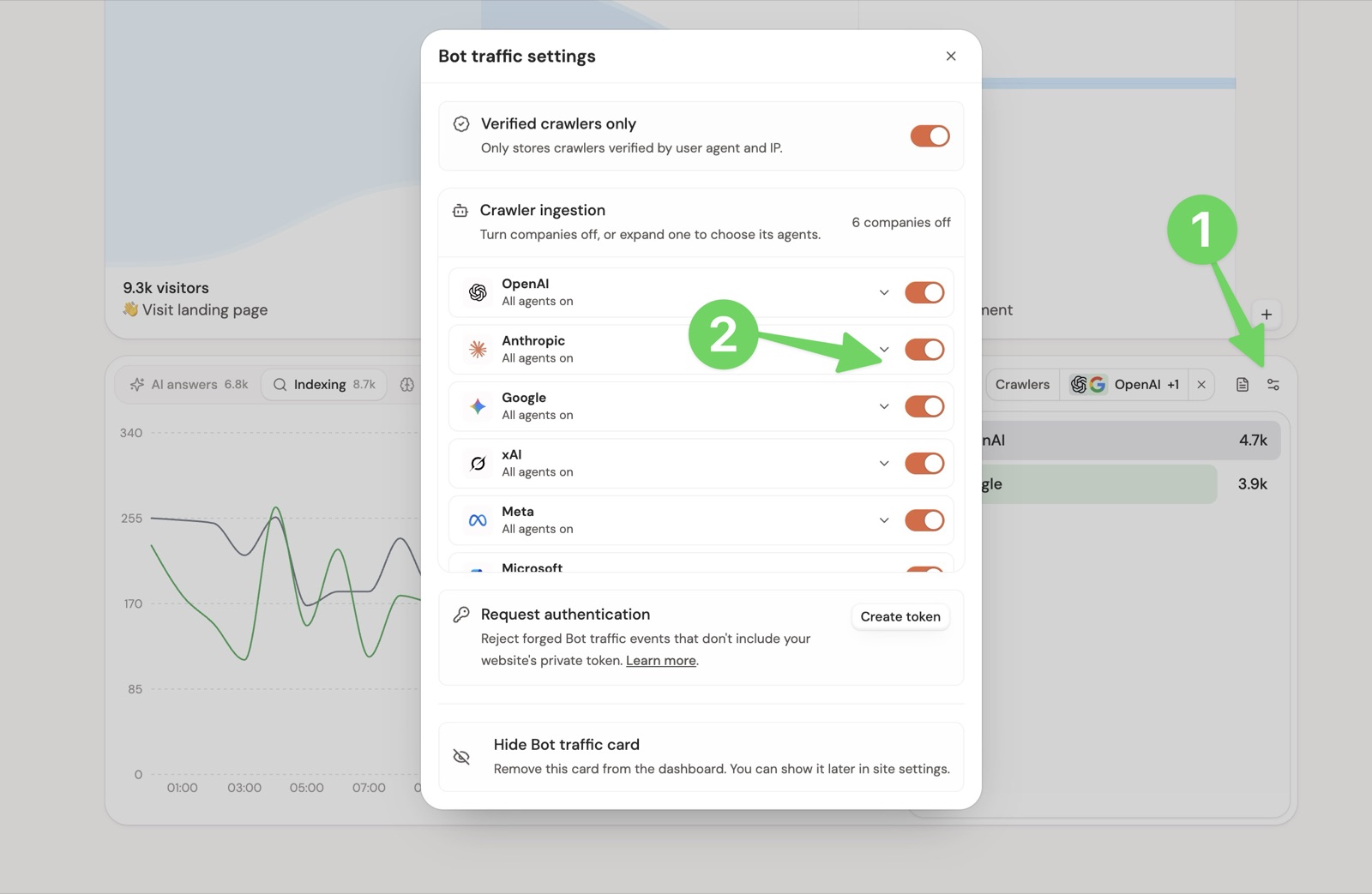
Disabled requests are skipped before storage, so they do not use your Bot traffic allowance. You can turn crawlers back on at any time, but skipped requests cannot be recovered.