
Website API
Use the Website API when you want to read analytics or send events for one website. These endpoints are usually authenticated with a
df_ website API key.A website API key is scoped to one website, so you do not need to pass
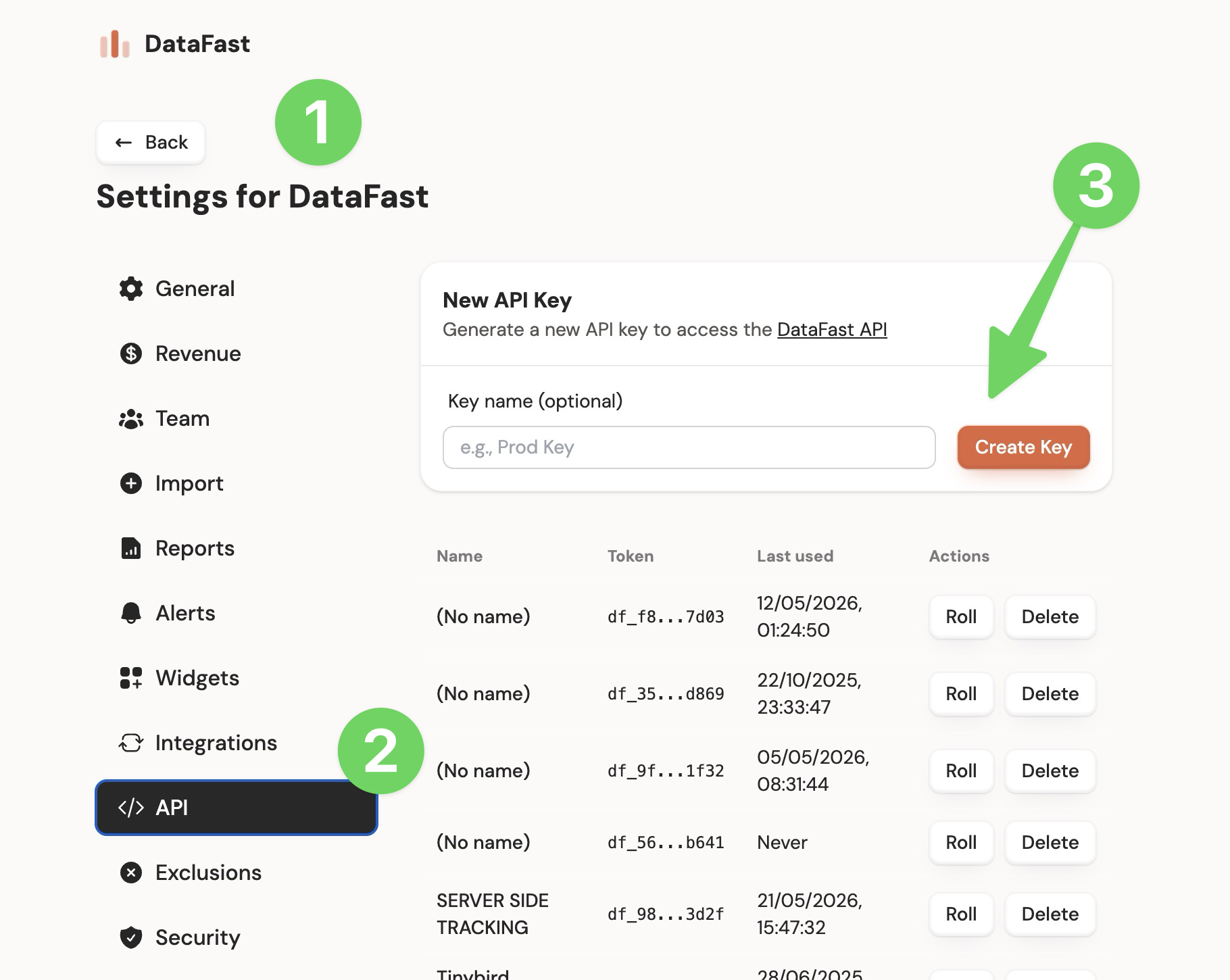
websiteId for most Website API requests. This makes it a good fit for backend integrations, scripts, dashboards, and AI agents that should not manage your full DataFast account.Get a website API key
Create website API keys in Website settings -> Developer. If you are signed in, use the website selector in this docs header to switch the link to another website.
What you can do
| Category | Endpoints | Use it for |
|---|---|---|
| Analytics | Analytics, Breakdowns, and Funnel analytics | Query dashboard-style analytics |
| Bot traffic | Bot traffic API | Query AI answer, indexing, and training requests; manage verification, authentication, and crawler ingestion |
| Visitors | Visitors | Search and inspect visitor journeys |
| Funnels | Funnel analytics | Query step-by-step funnel results |
| Events | Goals, Payments, Identity | Send server-side events and user profiles |
Token choice
- Use a
df_website API key for one website. - Use a
dft_account token only if you need to query multiple websites from one token. When usingdft_on Website API endpoints, passwebsiteIdas a query parameter.
Read authentication and scopes for the full difference.
Try it
Use the API playground to test Website API and Account API endpoints from the browser.