
Account API
Use the Account API when a backend, script, or AI agent needs to manage DataFast resources directly: websites, account tokens, website API keys, goals, funnels, alerts, team members, integrations, and settings.
These endpoints are public REST endpoints. You do not need to use the CLI to call them.
dft_ account token. Some website-scoped routes also accept a df_ website API key when the key belongs to the same websiteId. Read authentication and scopes before giving an agent write access.Get an account API token
dft_ token for account automation, CLI sessions, and AI agents that need to manage websites, goals, funnels, alerts, team members, integrations, or API keys.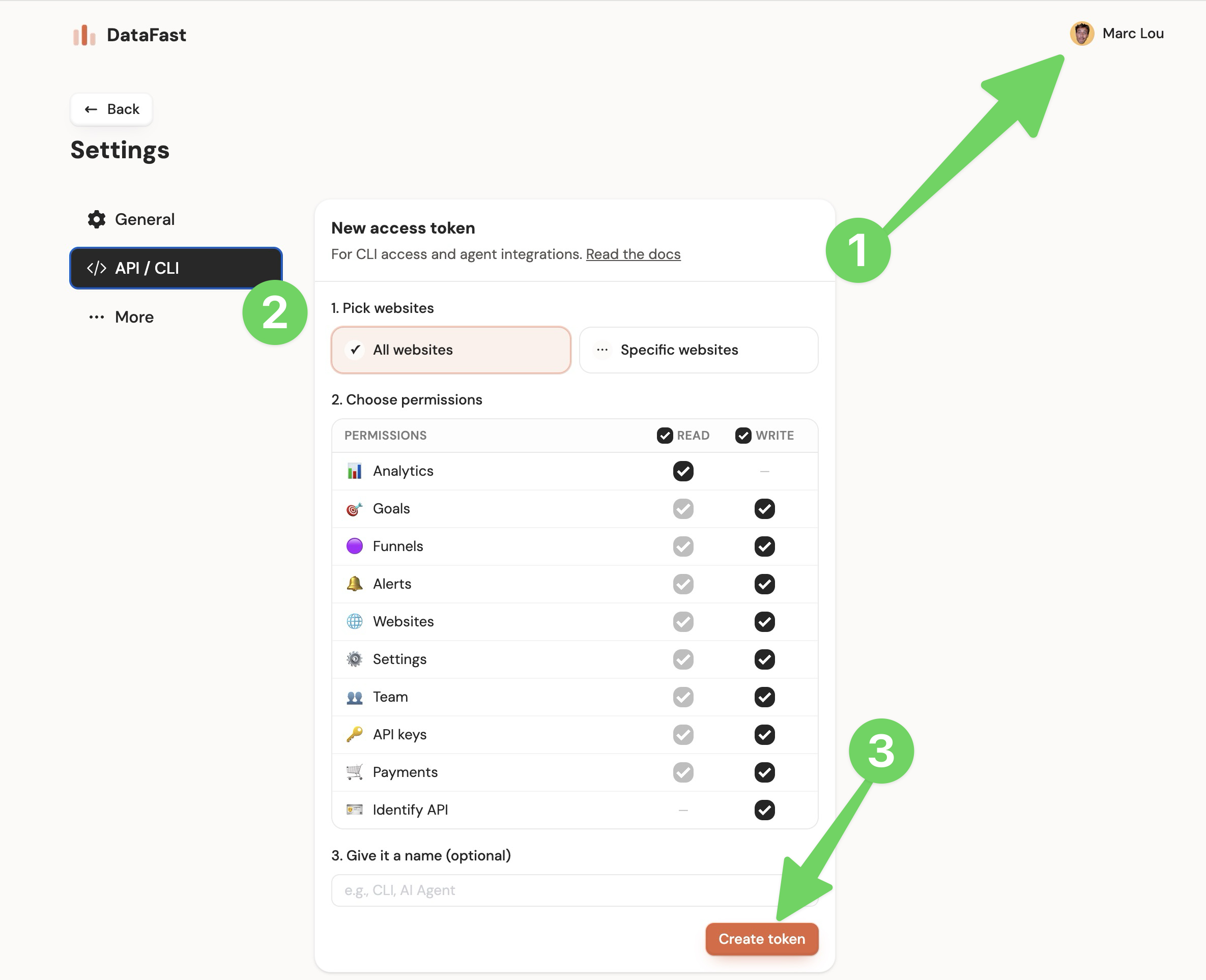
Base path
https://datafa.st/api/v1/admin
Endpoint groups
- Admin account
- Access tokens
- Websites
- Website keys
- Goals
- Goal customizations
- Funnels
- Alerts
- Team
- Integrations
Account endpoints
| Endpoint | Method | Path | Permission | Purpose |
|---|---|---|---|---|
| Get account | GET | /account | analytics:read | Get current user profile and plan info |
| Update account | PUT | /account | analytics:read | Update current user name |
Update account name:
curl -X PUT "https://datafa.st/api/v1/admin/account" \
  -H "Authorization: Bearer dft_xxx" \
  -H "Content-Type: application/json" \
  -d '{"name":"Jane Doe"}'
Account tokens
Use account tokens for CLI sessions, backend automation, and AI agents.
| Endpoint | Method | Path | Permission | Purpose |
|---|---|---|---|---|
| List access tokens | GET | /access-tokens | api-keys:read | List account tokens |
| Create access token | POST | /access-tokens | api-keys:write | Create an account token. The raw dft_ token is returned once |
| Delete access token | DELETE | /access-tokens/{tokenId} | api-keys:write | Revoke an account token |
Create a scoped token:
curl -X POST "https://datafa.st/api/v1/admin/access-tokens" \
  -H "Authorization: Bearer dft_xxx" \
  -H "Content-Type: application/json" \
  -d '{
    "name": "Read only agent",
    "permissions": ["analytics:read", "websites:read", "funnels:read"],
    "websiteIds": ["YOUR_WEBSITE_ID"]
  }'
Websites
| Endpoint | Method | Path | Permission | Purpose |
|---|---|---|---|---|
| List websites | GET | /websites | websites:read | List websites available to the token |
| Create website | POST | /websites | websites:write | Create a website |
| Get website | GET | /websites/{websiteId} | settings:read | Get website settings |
| Update website | PUT | /websites/{websiteId} | settings:write | Update website settings |
| Delete website | DELETE | /websites/{websiteId} | websites:write | Currently returns 403; website deletion is dashboard-only |
Create a website:
curl -X POST "https://datafa.st/api/v1/admin/websites" \
  -H "Authorization: Bearer dft_xxx" \
  -H "Content-Type: application/json" \
  -d '{
    "domain": "example.com",
    "timezone": "America/New_York",
    "name": "Example"
  }'
Update website settings:
curl -X PUT "https://datafa.st/api/v1/admin/websites/YOUR_WEBSITE_ID" \
  -H "Authorization: Bearer dft_xxx" \
  -H "Content-Type: application/json" \
  -d '{
    "name": "New name",
    "kpi": "signup",
    "kpiColorScheme": "green",
    "includeRenewalRevenue": true
  }'
domain, name, timezone, currency, kpi, kpiColorScheme, revenueMetric, isCookieless, includeRenewalRevenue, allowedHostnames, excludedIps, excludedPaths, excludedCountries, and excludedHostnames.Website API keys
df_ and are scoped to one website.| Endpoint | Method | Path | Permission | Purpose |
|---|---|---|---|---|
| List website keys | GET | /websites/{websiteId}/apikeys | api-keys:read | List website API keys |
| Create website key | POST | /websites/{websiteId}/apikeys | api-keys:write | Create a df_ key. The raw key is returned once |
| Roll website key | PUT | /websites/{websiteId}/apikeys/{apiKeyId} | api-keys:write | Roll an API key and return the new raw key once |
| Delete website key | DELETE | /websites/{websiteId}/apikeys/{apiKeyId} | api-keys:write | Revoke an API key |
Create a website API key:
curl -X POST "https://datafa.st/api/v1/admin/websites/YOUR_WEBSITE_ID/apikeys" \
  -H "Authorization: Bearer dft_xxx" \
  -H "Content-Type: application/json" \
  -d '{"name":"Production key"}'
Goals
| Endpoint | Method | Path | Permission | Purpose |
|---|---|---|---|---|
| List tracked goals | GET | /websites/{websiteId}/goals | settings:read | List tracked goals ordered by frequency |
| List goal customizations | GET | /websites/{websiteId}/goals/customizations | goals:read | List saved display customizations |
| Update goal customization | PATCH | /websites/{websiteId}/goals/customizations | goals:write | Set display name, color, or description |
| Delete goal customization | DELETE | /websites/{websiteId}/goals/customizations?goalName=... | goals:write | Reset a goal to default display metadata |
Use this endpoint when building a UI or agent flow that needs to choose from existing goals before setting a KPI, creating an alert, or creating a funnel.
signup_started to "Signup started", assign a chart color, or store an internal description for your team.Funnels
| Endpoint | Method | Path | Permission | Purpose |
|---|---|---|---|---|
| List funnels | GET | /websites/{websiteId}/funnels | funnels:read | List active funnels |
| Create funnel | POST | /websites/{websiteId}/funnels | funnels:write | Create a funnel |
| Update funnel | PUT | /websites/{websiteId}/funnels/{funnelId} | funnels:write | Update a funnel |
| Delete funnel | DELETE | /websites/{websiteId}/funnels/{funnelId} | funnels:write | Soft-delete a funnel |
Create a funnel:
curl -X POST "https://datafa.st/api/v1/admin/websites/YOUR_WEBSITE_ID/funnels" \
  -H "Authorization: Bearer dft_xxx" \
  -H "Content-Type: application/json" \
  -d '{
    "name": "Signup funnel",
    "steps": [
      { "name": "Landing page", "type": "pageview", "url": "/" },
      { "name": "Signup page", "type": "pageview", "url": "/signup" },
      { "name": "Signed up", "type": "goal", "goalName": "signup" }
    ]
  }'
pageview with a url, or a goal with a goalName.Alerts
| Endpoint | Method | Path | Permission | Purpose |
|---|---|---|---|---|
| List alerts | GET | /websites/{websiteId}/alerts | alerts:read | List alerts |
| Create alert | POST | /websites/{websiteId}/alerts | alerts:write | Create an alert |
| Update alert | PUT | /websites/{websiteId}/alerts/{alertId} | alerts:write | Update an alert |
| Delete alert | DELETE | /websites/{websiteId}/alerts/{alertId} | alerts:write | Delete an alert |
| Get alert history | GET | /websites/{websiteId}/alerts/history | alerts:read | Get recent alert trigger history |
Create an alert:
curl -X POST "https://datafa.st/api/v1/admin/websites/YOUR_WEBSITE_ID/alerts" \
  -H "Authorization: Bearer dft_xxx" \
  -H "Content-Type: application/json" \
  -d '{
    "name": "New signup",
    "trigger": { "goalName": "signup" },
    "template": {
      "subject": "New signup",
      "message": "A visitor completed signup."
    },
    "isEnabled": true
  }'
alertId and limit query parameters:GET /api/v1/admin/websites/{websiteId}/alerts/history?alertId={alertId}&limit=50
Team
| Endpoint | Method | Path | Permission | Purpose |
|---|---|---|---|---|
| List team members | GET | /websites/{websiteId}/team | team:read | List team members |
| Invite team member | POST | /websites/{websiteId}/team | team:write + owner role | Invite a team member |
| Remove team member | DELETE | /websites/{websiteId}/team | team:write + owner role | Remove a team member |
Invite a team member:
curl -X POST "https://datafa.st/api/v1/admin/websites/YOUR_WEBSITE_ID/team" \
  -H "Authorization: Bearer dft_xxx" \
  -H "Content-Type: application/json" \
  -d '{"email":"member@example.com","role":"viewer"}'
viewer and member. Team invite and remove actions require the caller to be the website owner.Integrations
| Endpoint | Method | Path | Permission | Purpose |
|---|---|---|---|---|
| Get integrations | GET | /websites/{websiteId}/integrations | settings:read | Get provider connection status |
| Connect Stripe | POST | /websites/{websiteId}/integrations/stripe | settings:write | Connect Stripe with stripeRak |
| Disconnect Stripe | DELETE | /websites/{websiteId}/integrations/stripe | settings:write | Disconnect Stripe |
| Connect Lemon Squeezy | POST | /websites/{websiteId}/integrations/lemonsqueezy | settings:write | Connect Lemon Squeezy with lemonsqueezyApiKey and lemonsqueezyStoreId |
| Disconnect Lemon Squeezy | DELETE | /websites/{websiteId}/integrations/lemonsqueezy | settings:write | Disconnect Lemon Squeezy |
| Connect Polar | POST | /websites/{websiteId}/integrations/polar | settings:write | Connect Polar with polarAccessToken and polarOrgId |
| Disconnect Polar | DELETE | /websites/{websiteId}/integrations/polar | settings:write | Disconnect Polar |
| Connect Paddle | POST | /websites/{websiteId}/integrations/paddle | settings:write | Connect Paddle with paddleApiKey |
| Re-sync Paddle payments | PATCH | /websites/{websiteId}/integrations/paddle | settings:write | Queue a historical Paddle payment re-sync |
| Disconnect Paddle | DELETE | /websites/{websiteId}/integrations/paddle | settings:write | Disconnect Paddle |
| Disconnect Shopify | DELETE | /websites/{websiteId}/integrations/shopify | settings:write | Disconnect Shopify |
| Disconnect WooCommerce | DELETE | /websites/{websiteId}/integrations/woocommerce | settings:write | Disconnect WooCommerce |
Provider credentials are stored by DataFast and never returned by the status endpoint.
Analytics with account tokens
websiteId query parameter:curl "https://datafa.st/api/v1/analytics/timeseries?websiteId=YOUR_WEBSITE_ID&fields=visitors&interval=day" \
-H "Authorization: Bearer dft_xxx"